
Free • No download
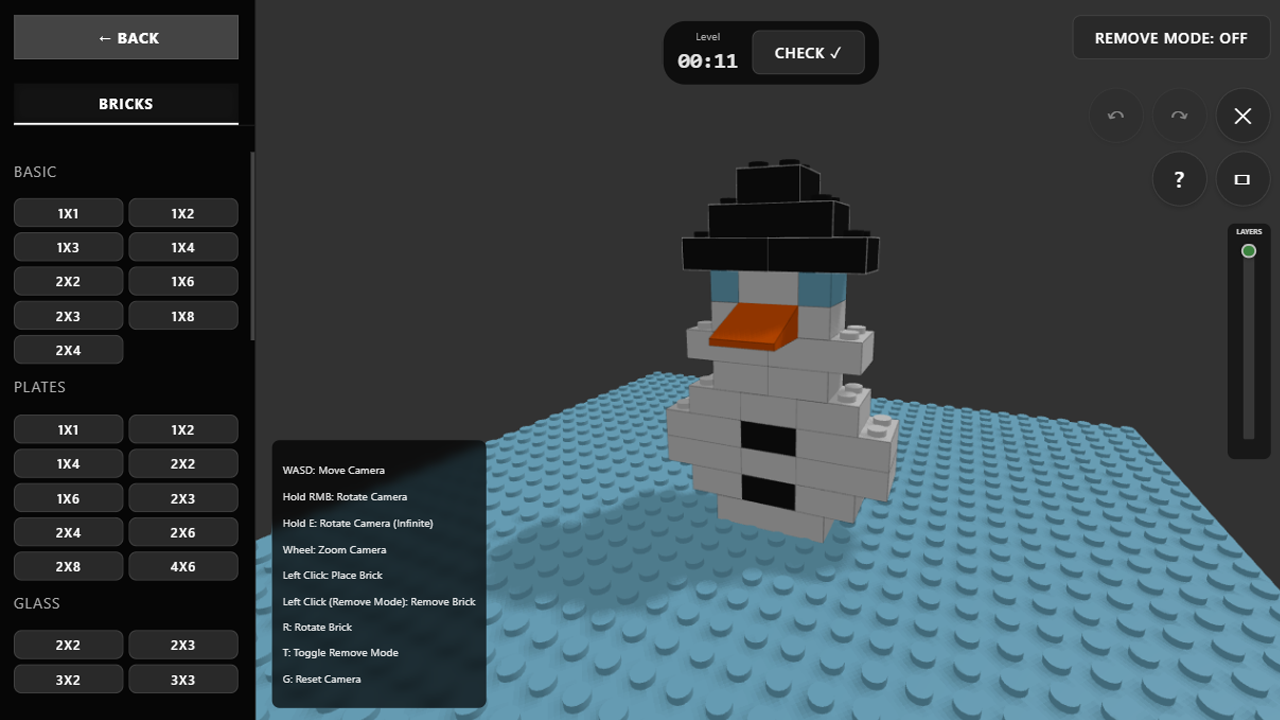
In Lego Constructor 3D, you can have fun building amazing structures, tackling speed tasks, and showcasing your designs in the gallery.
On PC: • WASD — move the camera. • Hold the mouse wheel (or press E) — rotate the camera around a point. • Mouse wheel scrolling — zoom in or out. • LMB (left mouse button) — place a brick. • R — turn the brick 90 degrees. • T — switch to removal mode. • G — return the camera to its default position. On mobile: • One finger — rotate the camera. • Two fingers spread apart or together — zoom in and out. • Virtual joystick — move the camera. • On-screen buttons — place, remove, and rotate bricks. Tips: • In Speedbuild mode, use the Layers slider on the right to hide upper rows and reveal what needs to be built inside. • If your laptop has a touchscreen, you can activate the mobile interface via the special button (rectangle icon) in the tutorial menu.

Yes. You can play Lego Constructor 3D online for free without buying the game or creating an account.
Yes. The game runs in a modern browser on phones, tablets, laptops, desktops, and Chromebooks.
No. Press Play and the browser game loads directly on this page.
Games related to Lego Constructor 3D.